Daily · Article 02 · 4 min read
Google extends Gemini Omni 1.2 Flash videos to 15 seconds
November 6 JST coverage · Google announcement dated November 5 · checked November 7 JST
Summary
A fictional shop shows what fits in five extra seconds, how app rollout differs from API access and how to estimate 720p output costs.
What could a shop show with five more seconds of video? In an announcement dated November 5, Google extended clips made with Gemini Omni 1.2 Flash, its video generation and editing model, to 15 seconds. It also described follow-up edits such as changing lighting or a background within the same clip. Google announcement
Key facts
Omni 1.1 supported clips up to 10 seconds and 1.2 raises the limit to 15 seconds. Google announced general availability through the Gemini API and Google Cloud. The consumer Gemini app is rolling out the feature to Google AI Ultra subscribers. Google Cloud lists an announcement price of about $0.07 per second for 720p video. Google Cloud announcement

1. What fits in one clip
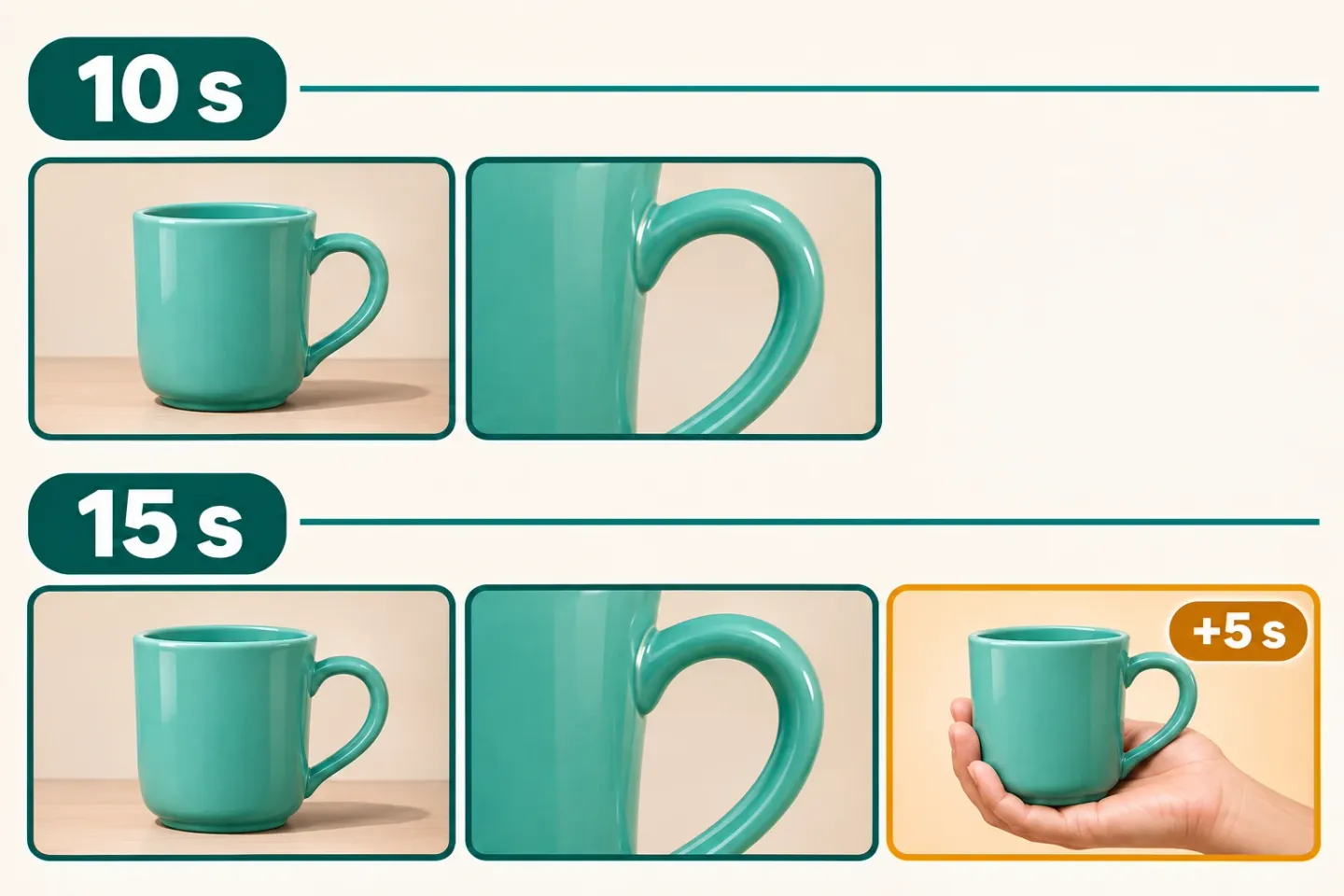
Imagine a shop introducing a mug with a distinctive handle. It could show the whole mug and its handle in the first 10 seconds, then use five more seconds to show its size in someone’s hand. The two edits below are fictional shot plans using the models’ duration limits. Check the output to see how closely it follows the planned shots and preserves the product’s shape.
The cat asks Q&A
 The researcher
Do I always have to make a 15-second clip in 1.2?
Pocket NotebookYou can choose a duration from 3 to 15 seconds in one-second steps. A short view may be enough to show the whole mug. Use more time when you need to explain the handle or show its size.
2. Change the lighting in the same clip
Google describes an editing workflow where you follow up after the first clip. The shop could supply a photo, make a clip and then ask for different lighting while keeping the mug and framing. The photo gives the model a reference for what to preserve. The shop can compare the edited clip with the original to check whether the shape and lettering survived the edit.
%% Mug video edit · fictional example
flowchart TD
  A["Shop supplies product photo"] --> B["Model makes first clip"]
  B --> C["Shop asks for new lighting"]
  C --> D["Model makes edited clip"]
D --> E["Shop checks handle and lettering"]The cat asks Q&A
- The researcher
If I ask for new lighting, will the product still match its photo?
Pocket NotebookThe photo gives the model a reference. Compare the handle and logo at the start, middle and end of both clips. If those details change, try a correction or use a real product shot.
3. Use it in your account or connect an app
For the same mug video, a shop owner could ask in the consumer Gemini app, or a developer could connect the shop’s software to the model. An API is a way for programs to send requests and receive results. Which access conditions apply depends on the route.
| Route | Who uses it and how | Announced availability | Source |
|---|---|---|---|
| Consumer Gemini app | Shop owner asks for a video in chat | Rolling out to Google AI Ultra subscribers | Google announcement |
| Gemini API / Google Cloud | Developer connects the shop’s software to request video | Paid tier on the Gemini API. General availability announced on Google Cloud | Gemini API pricing · Google Cloud announcement |
- Route
Consumer Gemini app
- Who uses it and how
- Shop owner asks for a video in chat
- Announced availability
- Rolling out to Google AI Ultra subscribers
- Source
- Google announcement
- Route
Gemini API / Google Cloud
- Who uses it and how
- Developer connects the shop’s software to request video
- Announced availability
- Paid tier on the Gemini API. General availability announced on Google Cloud
The cat asks Q&A
- The researcher
If a developer can use the API, can I make this in my Gemini app today?
Pocket NotebookCheck whether the rollout has reached your Ultra account. If you’re connecting the API, check the developer project’s access and billing separately.
4. What the length means for a 720p estimate
A 720p video has 720 lines of vertical resolution. Gemini API Standard pricing counts each second of 720p as 5,792 units of output usage called tokens, at $12 per million video output tokens. Rounding the per-second rate first changes the 15-second estimate, so the table rounds at the end. Gemini API pricing
| Output length | Example calculation | Estimated amount |
|---|---|---|
| 10 seconds | 57,920 tokens × $12 ÷ 1 million | About $0.70 |
| 15 seconds | 86,880 tokens × $12 ÷ 1 million | About $1.04 |
- Output length
10 seconds
- Example calculation
- 57,920 tokens × $12 ÷ 1 million
- Estimated amount
- About $0.70
- Output length
15 seconds
- Example calculation
- 86,880 tokens × $12 ÷ 1 million
- Estimated amount
- About $1.04
The cat asks Q&A
- The researcher
How should I budget if I need to redo the background?
Pocket NotebookRecord the work on drafts and on the final clip separately. The table covers video output. Check input material, edits, retries and requests to increase resolution separately when reviewing the bill.
To close
Choose a duration that serves the video
Google plans to route Gemini API calls for 1.1 to 1.2 at 1.2 rates starting December 3. Teams with an existing integration can check clip duration and projected costs before the switch. Gemini API transition notice
Decide what viewers should learn in the extra five seconds before choosing a length and budget. Before sharing an edit, check how the real product’s shape and logo appear in the clip.
Sources
- Google announcementblog.google
- Google Cloud announcementcloud.google.com
- Gemini API transition noticeai.google.dev