Daily · Article 01 · 17 min read · Series 2 episode
- Security
- Open source
PHP releases emergency patches for two critical vulnerabilities
October 21 fixes released · October 22 app observation and Cloudways rollout completion
Summary
The PHP team released 8.5.12, 8.4.27, 8.3.36 and 8.2.35 on October 21, fixing two remote code execution vulnerabilities. End-of-life 7.4, 8.0 and 8.1 got only minimal source backports, and WordPress operators need to ask their host whether the fix has reached the server's web-facing PHP.
PHP’s emergency fixes are out. The question has moved from “When will they arrive?” to “Which fix is actually running on my server?” Below, we follow why the two flaws happened and how the code was changed, then turn to what WordPress operators and anyone still on old PHP need to look after.
October 24 follow-up: Cloudways closed the existing incident on October 23 at 21:38 JST. Episode 3 explains PHP’s separate additional advice and application-setting checks. The app version observed below remains the October 22 14:03 JST record.
Key facts
The PHP team says 8.5.12, 8.4.27, 8.3.36 and 8.2.35 fix two remote code execution vulnerabilities. Operators serving web requests through PHP should update to the fixed release for their branch, or to the corresponding patched package from their supplier. PHP announcement · ChangeLog
| Key fact | Details |
|---|---|
| Two flaws | CVE-2026-109618: inconsistent internal data after a memory failure / CVE-2026-109619: old request state surviving after its memory is freed |
| Environments to check | Every way of running PHP for web requests, such as PHP-FPM, mod_php, php-cgi, FrankenPHP and LiteSpeed |
| PHP 7.4, 8.0 and 8.1 | These branches are out of support, so instead of a return to normal support they get special minimal source backports. Ask your supplier whether its packages include them and whether they are installed |
| Cloudways case | Cloudways is the hosting company I use to provide and manage the server environment. Directly observed this operating app’s web PHP 8.4.27 at 14:03 JST on October 22. At 19:11 JST, Cloudways reported rollout complete across all active servers, with additional assistance for a small subset of customers |
The explanation below is based on reading the actual fix commit included in PHP 8.5.12 and the separately published minimal 7.4 source change. We did not run an attack or investigate compromise of any particular WordPress site. 8.5 fix commit · 8.5.12 history · 7.4 source backport
| Branch | Affected · within that branch | Fixed release |
|---|---|---|
| 8.2 | 8.2.34 and earlier | 8.2.35 |
| 8.3 | 8.3.35 and earlier | 8.3.36 |
| 8.4 | 8.4.26 and earlier | 8.4.27 |
| 8.5 | 8.5.11 and earlier | 8.5.12 |

1. PHP’s desk and its workers
When a browser asks for a page, PHP loads the information it needs into memory and works on it. Think of memory as a desk where work is spread out for a while, and a worker as the person handling that job. The same worker can finish request A and then take on request B, so A’s temporary information should be cleared when its request ends.
What matters here is not a stored article file but the temporary data PHP uses while running, and the reference to it: a kind of address label saying where to read. If only the label remains and the spot it points to has already been cleared, the next task may read the wrong information. Official description of stale state
- 1. Open the pageSend a request: “Show me today’s horoscope.”
- 2. The server builds itPHP processes the request and generates an HTML document.
- 3. The browser displays itRead the returned HTML and display the page.
No input field or Submit button is required. A cache returning a stored complete page may avoid a fresh PHP execution.
The cat asks Q&A
 The researcher
Does PHP work even when I don’t type anything into a form?
Pocket NotebookIt can, because just opening a page sends a request to the server. A cache sometimes returns a ready-made page instead, but a read-only WordPress site still can’t skip the PHP check.
- The researcher
When a worker takes the next request, when does the old information get cleared?
Pocket NotebookNormally when the previous request ends. These two flaws arose where internal data has to stay valid even when processing fails and before the next request finishes initializing.
2. How PHP stops when memory runs out
PHP needs memory, a temporary workspace, to handle a request. A per-request limit keeps one task from using too much, and stopping when that limit is reached is itself a protective behavior. But what happens if internal data is only half built at the moment it stops?
In the first flaw, CVE-2026-109618, an out-of-memory interruption could make execution leave the operation abruptly, after which cleanup could treat half-built data as if it were valid. It is like handing an unfinished order form to the next person, who assumes it is complete. Unlike a website merely slowing down, the program handles invalid memory in a way that can affect what it executes. Official cause
The fix records that execution must stop and halts it at a safe execution point. A separate emergency path immediately ends the worker process if consumption first reaches a higher final limit. The figure simplifies the 8.5 fix, which neither removes the memory limit nor switches off the whole computer.
Before
- A request reaches the memory limit
- Execution abruptly jumps out
- Cleanup may use partially initialized data
After
- Record that the memory limit was reached
- Stop and unwind at a safe point
- Separate emergency pathExit the worker immediately if the higher hard limit is exceeded
The cat asks Q&A
- The researcher
If running out of memory is the problem, why not just give PHP more?
Pocket NotebookThe faulty stopping path would still be there. The problem is how PHP stops when memory runs short, so installing the fixed PHP is what solves it.
- The researcher
What happens to my website when the worker process ends?
Pocket NotebookA request handled by that worker may fail, or the worker may be replaced. That is not the same as turning off the server. Look at actual service effects and worker restarts in terms of your own hosting environment.
3. A note pointing to discarded material
The second flaw, CVE-2026-109619, is about two things whose lifetimes fall out of step: the data, and a note recording where the data is. A PHP worker could finish visitor A’s request and free its temporary memory while part of the state pointing into that memory survived. When the same worker took the next request, B, there was a path that touched that old state before the new initialization had finished. Official explanation
Imagine shredding a document but keeping a note that says “the document is in slot 3.” Open slot 3 later and there is no guarantee the same document is there. The analogy shows what it means to keep trusting a location that is no longer valid. The real flaw is in PHP’s internal memory; it is not a matter of a previous visitor’s post simply staying on screen.
The fix clears leftover references and state when a request ends, and also deals with information that reappears during shutdown and with access paths before the next initialization. Rather than counting on the next customer’s arrival to tidy up, it makes sure the next task cannot pick up invalid information once the current one ends.
Before
- Release request A’s temporary memory
- An old reference survives in shared state
- The same worker may use it in request B
After
- Clean up temporary request data
- Clear or reset references and state
- Prevent the next request from treating released data as valid
The cat asks Q&A
- The researcher
Data gone but a note still pointing to it: is there a name for that?
Pocket NotebookIt’s called
use-after-free: using memory after it has been released. Knowing a location is no guarantee that what’s there is still valid. - The researcher
When visitor B comes after visitor A, what has to line up for an attack?
Pocket NotebookThe same worker has to handle both, specific state has to survive, and a path has to use it before initialization. The official advisory also says the conditions vary with version, configuration and application behavior.
4. If you’re on PHP 7.4.33
PHP 7.4 is a branch whose normal support from the PHP project has ended. Given the severity, minimal fixes adapted for older branches were specially provided this time; these are called backports. Even after the code is published, a host still has to package it, distribute it and install it on your server. Official guidance · End-of-life record
The 7.4 fix is a minimal response built separately from 8.5. When a dangerous memory error occurs it ends the worker, clears freed location information and blocks the identified session upload-progress path. It does not block ordinary file uploads as a whole. The code appendix shows the actual differences.
| Situation | What to ask |
|---|---|
| Unmodified PHP 8.3.35 | Whether 8.3.36 for that branch, or a supplier package fixing both CVEs, has been installed |
| Display still says PHP 7.4.33 | Whether the supplier’s package backports both CVEs and has been applied to web-facing PHP |
| Display says only PHP 8.3 | The third version number or the package’s fix history; the branch number alone decides nothing |
Here is a fictional example, “Hosting A.” The company and situation are illustrative; the PHP release numbers are real. If Hosting A’s panel shows PHP 8.3.35, don’t stop at “it’s the 8.3 branch, so we’re fine”; ask whether 8.3.36 or a package backporting both fixes has been supplied and installed. If it shows 7.4.33, rather than waiting for a new official 7.4 release number, ask about the host’s extended-support fixes and the route to a supported branch.
The cat asks Q&A
- The researcher
Could a supplier have fixed it even though the version number hasn’t changed?
Pocket NotebookIt could. That’s why you read the version label alongside the supplier’s package fix history. Installation status shows up in that history, not in the number “7.4.33” or a note that “the host is responding.”
5. If WordPress is up to date, is PHP fine too?
WordPress is an application that runs on PHP. Updating WordPress core and plugins and fixing the PHP the server runs are jobs on different layers. PHP’s announcement urges updates for every installation serving web requests and considers the risk highest for mod_php, citing a demonstrated exploit in which an unauthenticated request can trigger the attack before any application code runs. PHP announcement · WordPress PHP guidance
mod_php runs PHP inside the Apache web server; PHP-FPM uses separate PHP worker processes that receive requests on their own. The first advisory notes a limitation on a particular FPM startup path, but that cannot be read as FPM being safe overall: the second advisory records a validated FPM path under its stated conditions. Conditions for the first flaw · Conditions for the second flaw
| What you observe | What it can’t tell you on its own |
|---|---|
| Current WordPress and plugins | Installation of the two PHP corrections |
| No login or upload form | Safety from requests sent directly to the server |
| PHP-FPM in use | Removal of every relevant attack path |
| Homepage working normally | Successful patching or absence of compromise |
The cat asks Q&A
- The researcher
So is this news that WordPress sites are already being hacked?
Pocket NotebookWhat has been demonstrated is an attack path that works. Whether it has been exploited on real sites, or whether any particular site was compromised, is outside what this article examined. It is still reason enough for operators to make sure the PHP fix is installed.
6. Switching PHP on Cloudways: a record
On the morning of October 22, I switched PHP for one live application at Cloudways, which I use for a personal WordPress deployment. This was done on the production app without a separate staging clone. The site name, domain, account and server identifiers are not published.
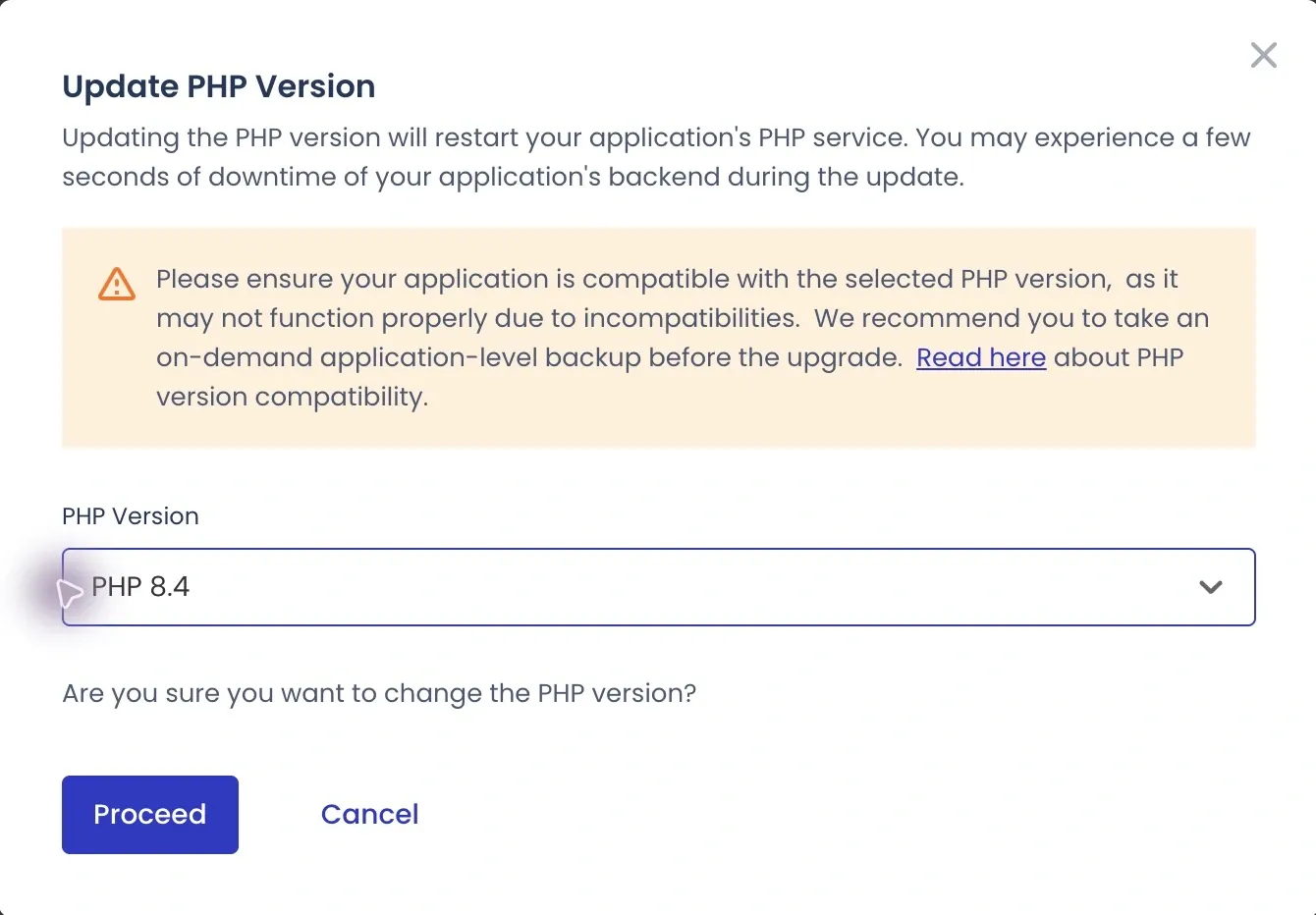
First, I secured a file and database restore point at 06:57:52 JST on October 22. The newest branch selectable under this app’s Application Settings → PHP Settings was 8.4. I used the per-application selector, so the change applies to that app and did not alter every PHP environment on the server. Cloudways per-application instructions
The cat asks Q&A
- The researcher
Can’t I pick an exact version like 8.4.27 here?
Pocket NotebookYou can’t. This screen selects a branch, and the host decides which patch package goes into that branch. After pressing the button, look again at the exact version WordPress actually uses.
7. The real version after the success message
Cloudways displayed a “PHP version updated successfully” notification. When I then freshly loaded WordPress Tools → Site Health → Info → Server, web-facing PHP had changed from 7.4.33 to 8.4.26, and the server API was fpm-fcgi, meaning PHP-FPM. These are actual screens from the same operation, not product images redrawn by AI.


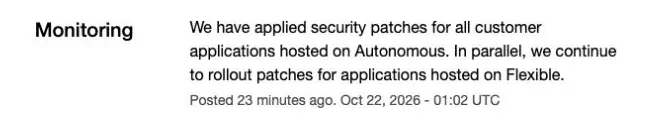
At 07:19 JST on October 22, Cloudways announced that interim configuration mitigations recommended by the PHP Group had been deployed across its fleet and official patches were rolling out in phases. Its 10:02 JST update then reported patches applied to all customer applications on Autonomous, with rollout continuing on Flexible. Autonomous and Flexible are different Cloudways hosting products; the application in this case uses Flexible. Cloudways incident
Freshly loading the same app’s WordPress server information at 14:03 JST on October 22 showed web PHP 8.4.27 and fpm-fcgi. PHP’s official 8.4.27 ChangeLog lists fixes for both security advisories. This establishes that the PHP actually serving web requests for this app now reports the official fixed version. No version change or settings save was performed during this recheck; the exact package replacement time is unknown. Official 8.4.27 ChangeLog

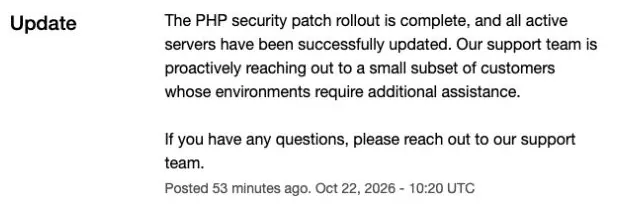
At 19:11 JST on October 22, Cloudways announced that its PHP security patch rollout was complete and all active servers had been updated. It repeated the announcement at 19:20 JST, adding that support was contacting a small subset of customers whose environments needed further assistance. At 19:22 JST, it said it was continuing to monitor for further issues; the incident status at that time was monitoring. Cloudways completion notice
The last direct observation of this app remains web PHP 8.4.27 / fpm-fcgi at 14:03 JST. The authenticated app session was inaccessible in the evening, so a further runtime recheck could not be completed. The provider’s fleet announcement and the afternoon app observation retain their own timestamps; they do not establish the state of CLI, scheduled jobs or every plugin function.
The cat asks Q&A
- The researcher
Where can I see whether my site is running the fixed version?
Pocket NotebookThe freshly loaded WordPress server information shows 8.4.27. That is the web PHP actually running the site, and PHP’s official ChangeLog includes these fixes in that version. Other apps, CLI and scheduled jobs were not verified by this check.
- The researcher
Does a completed rollout mean every customer’s problems are resolved?
Pocket NotebookCloudways explicitly says a small subset of customers still needs additional assistance. This operating case includes a direct afternoon observation of the fixed web PHP version, but the announcement alone cannot verify every environment’s functions or whether compromise occurred.
8. Morning settings and the afternoon recheck
| Morning07:08 JST observation | Result and meaning |
|---|---|
| Web PHP | 7.4.33 → 8.4.26, verified through the application’s response |
| Read functions | Home, an existing article, administrator post list and server information opened |
| Input fields | max_input_vars showed 10000 → 1000: the limit on fields accepted at once |
| Whole request size | post_max_size showed 100M → 10M, below the upload limit of 100M. WordPress flagged the mismatch. No increase back to the old limit before checking whether this relates to interim security measures |
| Settings observed unchanged | Memory 256M, upload 100M and execution time 300 seconds |
The table above and warning screenshot below record the 07:08 JST morning observation. At 14:03 JST, the page instead showed max_input_vars 10000, post_max_size 100M, upload limit 30M, memory limit -1, and execution time 300 seconds. -1 means no PHP memory limit for this setting; none of these values was changed during this review. The page does not show who changed them, when or why, so the morning 10M warning and the provider’s interim measures cannot be assumed to remain in the same state.
Switching versions can change settings too, and here two input-related limits appeared different. A changed input limit doesn’t mean the site is broken, but features that save large settings pages or menus are worth testing. This review covered the read functions above; every plugin feature, post saving, file uploads and scheduled jobs have not been tested yet.

During the morning review, I did not restore the request limit to 100M just to clear the warning. PHP’s official guidance also recommends smaller request limits as an interim measure to reduce exposure to some attack paths. Whether the morning 10M and input-field limits came from those measures was unverified; the reason for the afternoon’s changed values is also unknown. This record is not a recommendation to raise limits or remove memory restrictions. No settings were saved during this additional review. PHP interim measures and limits
The cat asks Q&A
- The researcher
If there’s an upload warning, can’t I just raise the limit?
Pocket NotebookFirst find out why it was lowered. The provider has reported interim security settings, and raising a related limit before checking could reduce protection. Check the site’s functions and the final security patch together.
9. Moving to a supported branch
Whatever you do about 7.4 right now, plan a move to a supported branch as well. Cloudways’ current Flexible instructions have you choose the version under My Applications → application → Application Settings → PHP Settings → PHP Version. Paths and what is offered can vary with the account, operating system and interface; its documentation, for example, says PHP 8.4 requires Debian 11 or 12. Cloudways upgrade instructions
- First, have current file and database backups and a way to restore them.
- Find out whether WordPress, the theme and plugins work with the target PHP, and try the switch on a cloned staging site first.
- Ask the supplier whether the final fixed package for that branch is available before changing production, and look at how far the change reaches other applications on the same server.
- After applying it, test the functions actually in use: article pages, administrator login, search, enquiries, bookings or payments. Recheck web PHP under WordPress
Tools → Site Health → Info → Server, and for a backport, record it together with the supplier’s fix history.
PHP’s guidance also lists interim settings that reduce exposure to particular paths, while stating that only an update is a complete solution. Settings such as removing the memory limit outright are not a fix a beginner should copy as is. Official measures and limitations · Site Health documentation
The cat asks Q&A
- The researcher
So what are the steps, in order?
Pocket NotebookConfirm the package with the final fix → prepare compatibility checks and backups → apply → test that the site really works. If you must stay on 7.4 for now, first ask whether the ELTS fixes for both CVEs are installed, and plan the migration alongside.
To close
From a published fix to my server
The releases and details awaited in part 1 are now public. At the heart of these code changes are handling internal data safely when execution stops, and leaving no invalid information between requests. The operator’s question now shifts from “Is the patch out?” to “When, and through which package, did both fixes reach the PHP serving my site?”
On October 21, before the release, Japan’s security agency IPA used its preparation notice to urge operators to take stock of where they use PHP and be ready to apply fixes as soon as they appeared. Now that the fixes are out, that preparation has to turn into installing them and testing that sites still work. Part 1: the PHP warning and WordPress checks covers the basics and the situation before the release.
In its October 22 post-release guidance, IPA lists the fixed versions in all four branches and recommends applying updates. Where an unsupported environment cannot be patched or migrated readily, it recommends organizational planning for interim measures, maintenance staff, budgets and migration. If effective interim measures are not feasible, operators should assess whether external access must be blocked or the service temporarily stopped.
Appendix · the actual code changes
The two fixes in code
This optional technical appendix isn’t needed to decide how to respond. It covers the commit included in 8.5.12 and selected paths in the minimal 7.4 fix; the excerpts are parts of a larger patch, and we did not audit the whole source tree or reproduce an attack.
1. The changed stopping and cleanup paths in 8.5
The actual Zend/zend_alloc.c change reworks the old zend_bailout() path and adds delayed OOM handling, which records the memory failure for later, plus a separate final-limit check. On the execution side, Zend/zend_execute_API.c checks ZEND_HAS_OOM() to handle the delayed error. Execution now stops at the next safe point, and if a higher hard limit is exceeded, _exit(137) ends the worker process immediately. Actual allocator and execution changes
- The researcher
Why have both an immediate _exit and a stop at a safe point?
Pocket NotebookThey respond to different limits. At the ordinary limit, execution carries on to a safe point so cleanup never touches half-built data; at the higher final limit, the worker ends immediately. An emergency exit does not follow every normal stop.
2. Actual lines that clear stale state
In the actual Zend/zend_execute_API.c diff, request shutdown now clears the error and exception handlers with ZVAL_UNDEF(...), sets the error array to NULL and resets the error count to 0. A code comment also explains that the state could otherwise be used before the next initialization. Instead of leaving it to the next request to initialize everything, the fix tidies up references and state when the previous request ends. Actual executor-state changes
EG(num_errors) = 0;
EG(errors) = NULL;
EG(error_handling) = EH_NORMAL;
These are actual lines added in the 8.5 fix commit. EG(errors) points to internal error information; EG(num_errors) is its count. NULL is a value meaning there is nothing to point to, and 0 clears the remaining error count. Commit 31c0ea7
- The researcher
What changes when it’s set to NULL?
Pocket NotebookIt marks that there is currently no valid data to point to. That part stops missing data from being trusted as if it were still there.
3. 7.4’s separate minimal fix
The actual 7.4 commit 712e60f… calls itself a minimal mitigation for an EOL version right in its message; EOL means end of life, the end of support. Its Zend/zend_alloc.c error path now ends in _exit(1). In main/SAPI.c, freed references including authentication-related fields are set to NULL. In ext/session/session.c, the relevant upload-progress callback path is disabled. 8.5’s delayed OOM handling and 7.4’s minimal response are different implementations. Actual 7.4 source changes
- The researcher
Where does an operator put this code?
Pocket NotebookOperators don’t add it themselves. This is source for the PHP runtime itself, not a post or theme code. Operators install the patched package their supplier builds, and this appendix is for understanding what changed.
Sources
- PHP follow-up originalphp.net
- Official measures and limitationsphp.net
- Official 8.4.27 ChangeLogphp.net
- Commit 31c0ea7github.com
- 8.5.12 historygithub.com
- Actual 7.4 source changesgithub.com
- Conditions for the second flawgithub.com
- Conditions for the first flawgithub.com
- End-of-life recordphp.net
- WordPress PHP guidancewordpress.org
- Cloudways per-application instructionssupport.cloudways.com
- Cloudways completion noticestatus.cloudways.com
- Cloudways upgrade instructionssupport.cloudways.com
- Site Health documentationwordpress.org
- preparation noticeipa.go.jp
- post-release guidanceipa.go.jp