Daily · Article 01 · 14 min read
- Security
PHP announces critical patches for two vulnerabilities
October 20 security article · notice posted October 21, 05:32 JST · compiled retrospectively October 21 · WordPress sources checked 18:02 JST
Summary
A record from before release, when PHP announced fixes for two vulnerabilities rated 9.2 for October 21 at 23:00 JST/KST. The fixes have since been published; part 2 covers the actual changes. Updating WordPress core or plugins doesn't change the server's PHP, so operators should look up their PHP version under Site Health and ask their host when the fix will be applied.
On a day spent waiting for new features, a security notice came first. The PHP security team announced an upcoming release fixing two critical vulnerabilities. This special issue separates what the notice tells us from what it does not yet say.
Daily article 01 is dated 2026.10.20 and was compiled retrospectively on October 21. The official notice bears an October 20 date; its 20:32 UTC timestamp corresponds to October 21 at 05:32 in Japan and Korea. The article date follows the notice, while editing and publication took place on October 21. Original notice record
Behind a website, a server receives each visitor’s request and builds the page; on a PHP site, PHP does that work. This notice concerns two flaws reported to let an attacker interfere with that work. The first thing an operator needs is the PHP version their site runs and the person responsible for updating it. No technical vocabulary is needed beforehand.
Key facts
The PHP security team has scheduled a security release fixing two critical vulnerabilities for October 21 at 23:00 JST/KST, 11 p.m. in Japan and Korea. Both are rated 9.2. Affected versions and technical details will accompany the release. Official PHP notice
watchTowr is a cybersecurity company that researches vulnerabilities and tests whether business systems can be attacked; it is separate from the team that develops PHP. It describes this case as reported remote code execution (RCE): an attacker getting a server to run the attacker’s own program instructions. That is the security company’s analysis; PHP’s developers have not yet released technical details. About watchTowr · Analysis of this issue
Cloudways is the hosting provider I use for a WordPress site I personally run. A hosting provider supplies and manages the server environment that keeps a site available online. It appears in this article as my own operating example. Cloudways’ official introduction
| Who | Role in this story |
|---|---|
| PHP development team | Develops PHP and announces the official affected scope and fixes. |
| Security company watchTowr | Publishes vulnerability analysis and explanations. |
| Cloudways, my hosting provider | Supplies and manages my WordPress site’s server environment and communicates its response. |

The cat asks Q&A
 The researcher
Will watchTowr fix the PHP on our site too?
Pocket NotebookNo, watchTowr analyzes and explains the issue. The PHP team releases the fix, and applying it to your server is up to a host such as Cloudways or the site operator.
1. A request goes out even without a form
Imagine opening an address to read a daily horoscope. Without typing anything, the browser sends the server a request, “Show me this page,” and the server returns the matching content. Posting and upload forms are just one of several ways to send requests. How browsers and servers exchange requests
The computer handling the request behind the screen is called the server. On a PHP-based site, the server can run a program written in PHP to build the page. What the browser receives is usually HTML, a document containing the text and page structure. PHP works on the server; the browser displays the result. PHP’s introduction
- 1. Open the pageSend a request: “Show me today’s horoscope.”
- 2. The server builds itPHP processes the request and generates an HTML document.
- 3. The browser displays itRead the returned HTML and display the page.
No input field or Submit button is required. A cache returning a stored complete page may avoid a fresh PHP execution.
| What the visitor sees | What to look at behind it |
|---|---|
| Read-only WordPress without comments or posting | Whether PHP is used to generate pages or handle other work |
| A static site serving complete HTML/images without executing PHP at all | PHP execution flaws do not directly apply to that path; check any separate PHP service on its own |
The cat asks Q&A
- The researcher
There are no comments or posting fields. Does just reading a page send a request?
Pocket NotebookIt does. Opening an address or following a link sends a request for the page, so a WordPress site whose visitors only read still needs its PHP environment looked at.
- The researcher
Then does PHP run again for every page view?
Pocket NotebookNot always. If a server or an intermediary returns a cache, a complete page stored earlier, that request may not run PHP again. Caching still leaves PHP in place across the rest of the site. WordPress caching guidance
- The researcher
Besides the site’s forms, how else can an attacker send a request?
Pocket NotebookStraight to the server, without touching its input fields. What matters is which programs and settings handle the request. That is ordinary web behavior; the exact attack conditions for these two flaws have not been published yet.
2. When a server runs an attacker’s instructions
A server receives requests from visitors all the time. It handles them within functions the developer allowed in advance, such as showing a post.
Remote code execution means getting a server to run code, or program instructions, sent from another computer by an attacker. Think of a diner choosing a dish from the menu, and a diner rewriting the kitchen’s work orders.
Normal request
Within functions prepared by the developer
- “Show me the post”
- Run the prepared lookup function
- Return the post
Remote code execution
If attacker-chosen instructions can run
- Attacker chooses instructions
- Server executes those instructions
- Accessible files or data may be affected
Requesting an intended function differs from an attacker choosing the program instructions themselves. Consequences depend on the server process’s permissions and environment.
The cat asks Q&A
- The researcher
A normal request asks the server to do something too. What’s different?
Pocket NotebookWho decides what runs. “Show this post” uses a function the site provides; remote code execution goes past that boundary and runs program instructions chosen by the attacker.
- The researcher
How far can code that runs that way reach?
Pocket NotebookAs far as the server’s permissions allow, into its data and functions. That’s how the damage can spread beyond the page, and the specific consequences of these flaws will only be known once PHP publishes the details.
3. What harm could this lead to?
The harm from RCE depends on what the account running those instructions can read, change or connect to. It does not automatically come with administrator control over the whole server. Code-execution consequences described by MITRE, which maintains security weakness classifications
The table below uses an imaginary site that accepts inquiries to show harm in general terms. These are not incidents caused by these PHP flaws, and they do not describe data stored on my site or anything that happened to it.
| Possible harm | Example and conditions |
|---|---|
| Data theft | If stored inquiry messages and email addresses can be read and transmitted outside, those records could be copied away while the homepage looks unchanged. |
| Site modification | If site files or the database can be modified, a notice or link on the legitimate homepage could be replaced with content chosen by an attacker. |
| Service interruption through encryption or deletion | If the files used to build pages can be altered or deleted, they could become unreadable and leave the site unavailable. |
MITRE’s catalog of attack techniques also treats collecting information from server files or databases separately from altering an external site’s content. The first can happen while the homepage looks fine; the second is immediately visible to visitors. Data collection explained · External site defacement explained
The cat asks Q&A
- The researcher
So data could be taken while the homepage still looks fine?
Pocket NotebookIt could. Copying data and changing the page happen independently, so a site that loads normally is no proof that nothing was stolen.
- The researcher
What makes site modification worse than a few changed words?
Pocket NotebookVisitors trust notices and links at the legitimate address as something the operator published. If a guidance link is swapped for an unrelated destination, an attacker can use that trust to mislead them.
- The researcher
Could that include ransomware that locks files and demands money?
Pocket NotebookUnder the right conditions, yes. Ransomware is malicious software that makes data unusable and demands payment for recovery; if encryption code can run and alter the site’s files, it can take the service down. RCE alone does not hand over every file or the whole server, though: how far it goes depends on the permissions involved. MITRE’s explanation of ransomware encryption
- The researcher
Then is installing the patch the end of it?
Pocket NotebookA patch closes the route back in through the same flaw; it does not restore altered files or undo data theft. If a compromise is suspected, investigate the traces and recover the site together with the host.
4. Is my site affected?
“Our server uses PHP. Are we affected?” At the time of reporting, PHP’s official notice did not yet list affected or fixed versions. Using PHP is not enough on its own to say whether your installation is affected.
What helps now is knowing whether your service uses PHP and, if so, which version. That lets you compare it with the affected list once details are published. 9.2 is a severity rating, not the probability that your server will be attacked. CVSS specification
IPA, the Japanese public agency that guides information-security responses, also cites a warning from CERT-EU, the cybersecurity service for EU institutions. Based on other sources, CERT-EU reports the identifiers CVE-2026-109618 and CVE-2026-109619 and possible impact on PHP 5 and later. IPA says it has not yet confirmed the detailed affected and fixed versions either. It is a warning that exposure may be broad; the conditions for your own server will be settled by the official details. IPA notice · CERT-EU advisory
The cat asks Q&A
- The researcher
Nothing is settled yet. What does knowing my version in advance change?
Pocket NotebookYou can compare it with the official affected versions as soon as details appear. Knowing “our version” beforehand means you won’t lose time digging through the server at that point.
5. Preparing without touching code
There are three things an operator can note down without knowing any code: the service name, whether it uses PHP and which version, and who handles updates. If a hosting provider manages the site, there is no code to fix yourself; the operator can ask the provider about those three things. The editors’ suggested question reads:
Does our service use PHP? Which version does it run, and who will check and apply this security update?
The scheduled release is October 21 at 23:00 JST/KST. PHP says it may release earlier if details become public or evidence of exploitation appears. The order is to see the actual release and the fix for your version first, then apply and test.
The cat asks Q&A
- The researcher
Can someone who can’t change server settings still send that question?
Pocket NotebookThey can. If you run the server, you look up the version yourself; if someone else manages it, you ask them. Ask in the same message whether the patch is out and whether it has reached your service.
6. Can a public patch give attackers clues?
PHP’s source code, the program that defines how PHP itself works, is public in the official GitHub repository php/php-src. Developers can read the code and its history, and so can attackers. PHP’s security policy, however, says vulnerability reports stay private until publication, so these security fixes are kept private until release even though the repository is public. Official source · Security reporting policy
Microsoft’s browser security researchers describe attackers studying public fixes and targeting environments the fixes have not yet reached. It is a separate case from PHP, showing why the gap between publishing a fix and deploying it is dangerous. Why that gap matters
General risk: changes become public → clues to the vulnerable behavior are analyzed → attempts may target unpatched environments with matching conditions.
| Stage | Meaning for my site |
|---|---|
| PHP releases a fix | A repair exists; it is not yet installed on my server |
| The host prepares a patched package | The host can provide it; whether it reached my server is still unknown |
| The fix runs on my server and is checked | The repair has actually landed in that environment |
The cat asks Q&A
- The researcher
By looking at what changed in a patch, could someone work backwards to what was weak?
Pocket NotebookThey could. The difference between old and new code can hint at the vulnerable behavior. A working attack still needs the flaw’s mechanics and the server conditions to line up.
- The researcher
So when can I say “the patch is out, we’re fine”?
Pocket NotebookOnce it is applied on your server and you have seen the site working. Preparing the PHP inventory, owner, backups and compatibility checks before release shortens that wait. With Cloudways, ask both when it will supply the fix and when it will apply it to your server.
7. IPA’s call to prepare
IPA also called for preparation on October 21: identify PHP usage where practical and be ready to apply fixes as soon as they are released. In the same notice, IPA says it has not confirmed attacks exploiting these two flaws. IPA preparation notice
The cat asks Q&A
- The researcher
No attacks have been confirmed, so why prepare now?
Pocket NotebookBecause attacks could follow soon after the fixes are published. IPA says it has not confirmed any, and its warning is to get ready for that window in advance.
8. The PHP version behind a WordPress site
WordPress, used for blogs and shops, also runs on PHP. PHP is managed on the hosting server, so updating WordPress or its plugins does not by itself mean PHP has been patched. WordPress guidance
You can see the version in the WordPress dashboard under Tools → Site Health → Info → Server → PHP version. The screen only displays information; it changes no settings. If the menu is missing, ask your site administrator or host. Site Health documentation · WordPress code that builds the PHP version field
The cat asks Q&A
- The researcher
When will I know whether my WordPress site is affected?
Pocket NotebookOnce PHP publishes the affected and fixed versions and you match those details against your server environment. At 22:24 JST on October 21, PHP’s official notice still had neither. PHP notice
- The researcher
Once I’ve found the version, where does the update happen?
Pocket NotebookWith ordinary hosting, through the provider’s PHP settings or support team. If you manage your own server, its operator handles it, and menu names and automatic-update coverage vary by provider.
9. A PHP warning on a real dashboard
This is a real WordPress dashboard, used with the operator’s permission. Its Japanese heading says “PHP update required,” and the notice reports running PHP 7.4.33. Read PHP (7.4.33) inside the warning rather than the browser tab or the WordPress core version.
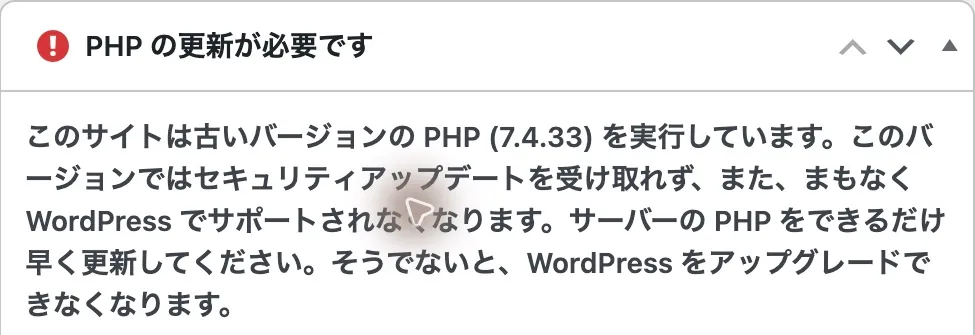
The PHP project’s official support for PHP 7.4 ended on November 28, 2022, so this site needs to prepare a move to a supported version. A host may separately supply fixes through extended security support, however, so the version number on screen cannot tell you whether the host has applied them. PHP end-of-life list
| What the screen shows | What this screen alone cannot show |
|---|---|
| The site reports running PHP 7.4.33 | The specific exposure conditions for these two flaws |
| WordPress displays an outdated-PHP warning | Whether the host has supplied separate security fixes |
| PHP maintenance and an upgrade plan need attention | Whether an attack or compromise has occurred |
The cat asks Q&A
- The researcher
Does the red warning mean this attack already happened?
Pocket NotebookNo, it warns that the site runs an old PHP version. It is not the result of testing for these flaws or for a compromise, so the operating system’s or host’s fix records need reading too.
- The researcher
Then what should I look at when moving to
8.x?Pocket NotebookWhether that version includes this fix comes before the major version number. Check theme and plugin compatibility with a backup and a staging site, then apply it, and afterwards look at whether the site still works.
10. What to ask your host
At 18:16 JST on October 21, Cloudways announced interim mitigations for this issue and work with ELTS (extended support) partners for older versions. The notice does not say that any particular server has received the final patch. Cloudways incident notice
WordPress.com says it handles required PHP updates. Whether this particular security patch is installed shows up in the provider’s response to this notice or a support reply, rather than in that general policy. WordPress.com server settings
A question for the host could read:
Which PHP version does my site run, and is it affected by this notice? Who will apply the fix, and when? Please confirm the resulting version and whether the site works afterward.
Before applying it, prepare backups of site files and the database, and a way to restore them, and check WordPress, theme and plugin updates and PHP compatibility. Older components can break on newer PHP. Restoring a site backup does not roll back the server’s PHP, so agree with your host on what happens if something goes wrong. WordPress update guidance
The cat asks Q&A
- The researcher
What should I ask the host?
Pocket NotebookAs in the question above, ask in one go about the current PHP version and exposure, who applies the fix and when, and the resulting version and whether the site works. That brings out both your environment and the person responsible.
- The researcher
Is opening the homepage enough afterward?
Pocket NotebookCheck the functions the site actually uses as well: login, publishing, forms or checkout. Try it in staging first where available, and ask the host separately whether production now runs the patched PHP.
To close
Why this news matters
This is a security issue about what code may run behind a website. For anyone operating a service on PHP, the questions that matter are whether their environment is affected and when the relevant fixed version arrives.
Knowing whether you use PHP, the current version and who handles updates makes it quicker to decide on a response once official details arrive. If you don’t manage the server yourself, the hosting provider or operator is the link between the announcement and your site.
Official WordPress documentation was reread on October 21 at 18:02 JST.
Sources
- Original notice recordraw.githubusercontent.com
- PHP noticephp.net
- About watchTowrwatchtowr.com
- Analysis of this issuewatchtowr.com
- Cloudways’ official introductioncloudways.com
- How browsers and servers exchange requestsdeveloper.mozilla.org
- PHP’s introductionphp.net
- WordPress caching guidancedeveloper.wordpress.org
- Code-execution consequences described by MITRE, which maintains security weakness classificationscwe.mitre.org
- Data collection explainedattack.mitre.org
- External site defacement explainedattack.mitre.org
- MITRE’s explanation of ransomware encryptionattack.mitre.org
- CVSS specificationfirst.org
- IPA preparation noticeipa.go.jp
- CERT-EU advisorycert.europa.eu
- Official sourcegithub.com
- Security reporting policygithub.com
- Why that gap mattersmicrosoftedge.github.io
- WordPress update guidancewordpress.org
- Site Health documentationwordpress.org
- WordPress code that builds the PHP version fielddeveloper.wordpress.org
- PHP end-of-life listphp.net
- Cloudways incident noticestatus.cloudways.com
- WordPress.com server settingswordpress.com