Daily · Article 03 · 5 min read
- OpenAI
ChatGPT adds locked chats to hide saved conversations from view
Announced October 20 · official sources rechecked October 21
Summary
ChatGPT is rolling out locked chats. A locked conversation drops out of your regular list and search, and only your PIN or Face ID opens it again. Reset the PIN and the locked chats are deleted for good.
You're about to share your ChatGPT screen in a meeting, and the sidebar is full of personal chat titles. You don't want to delete them, and you'd like to read them again after the meeting. That's what locked chats are for.
Key facts
OpenAI introduced locked chats in its October 20 Enterprise/Edu release notes. A locked chat disappears from your regular history, pinned list and ordinary search, and you have to authenticate to open it again. On work accounts, the organization's retention and compliance rules still apply to locked chats. Release notes
The usage guide lists Free, Go, Plus, Pro, Business, Enterprise and Edu. The rollout is gradual, so some accounts don't have the menu yet, and some conversations, such as Codex chats and local Work chats, can't be locked. Official guide

1. Locking a chat, and finding it again
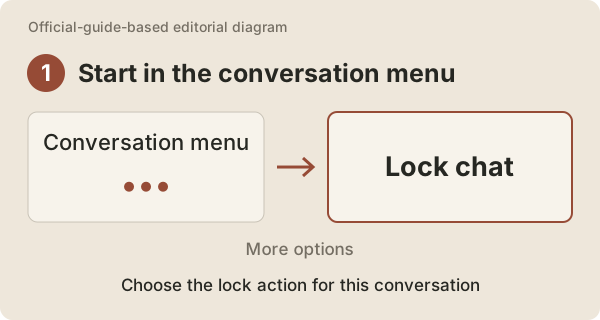
Open the chat's ••• → Lock chat menu and confirm. The chat leaves your regular list, and from then on it appears only under Projects → Locked chats. You pick chats one at a time, so you can lock a personal note and leave the meeting draft where it is.
The cat asks Q&A
 The researcher
It's gone from the list, but I can still search for it by title, right?
Pocket NotebookNo. Locked chats are left out of ordinary search too. To find one, go to
Projects → Locked chats. Finding chats- The researcher
So can I start sharing my screen right after I lock it?
Pocket NotebookOn the web, the tab you were reading can stay open on that chat. Other devices keep showing the title until their list refreshes, and the iOS app can keep preloaded content until it refreshes. Take one look at your screen before you hit share. Official guide
2. One PIN for the whole account
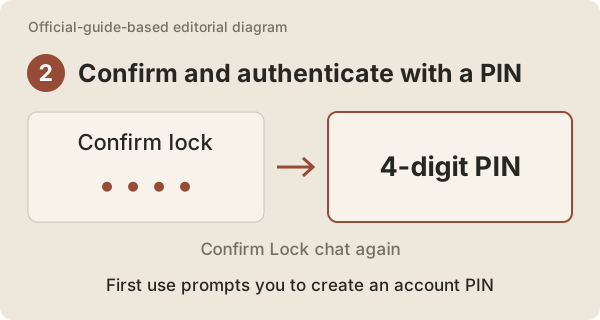
The first time you lock a chat, you set a four-digit PIN and enter it again to confirm. The PIN belongs to your account, so you don't make a new one for each chat. On supported devices you can also open locked chats with Face ID, Touch ID or your device unlock.
The cat asks Q&A
- The researcher
My phone opens them with my face. Does it matter if I forget the PIN?
Pocket NotebookDevice unlock is set up separately on each device, and changing the PIN takes the current one. What happens if you forget it is in section 6. Official guide
3. Reading a locked chat vs unlocking it
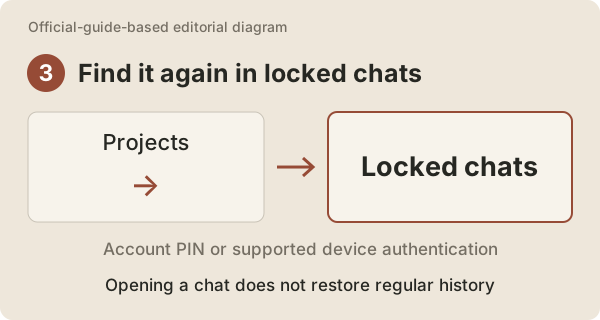
To read a locked chat again, authenticate in Projects → Locked chats and pick the conversation. Opening it doesn't unlock it: the chat stays out of your regular history and search. To move it back to your regular list, use Unlock chat. Finding chats
Saved conversation
- Regular history
- The cat’s research notes
- Locked chats
- Not here yet
Lock with Lock chat
- Regular history
- Hidden from the list
- Locked chats
- Authenticate to open
Authenticate to read
- Regular history
- Still hidden
- Locked chats
- The cat’s research notes
Unlock chatBack to regular history
The cat asks Q&A
- The researcher
What if I need to hand my screen to someone right after reading?
Pocket NotebookPress
Lock nowand it locks again on the spot. On the web, moving to another chat in the same tab doesn't lock it, so use the button. Official guide
4. Archive, lock or delete?
All three clear a chat out of your list, but what happens next is different.
| What you want | Feature | How you find it later |
|---|---|---|
| Tidy the list but keep the record | Archive | Ordinary search or archived chats |
| Keep it, but out of the list and search | Lock chat | Authenticate in Locked chats |
| Get rid of a chat you no longer need | Delete | It can't be recovered |
Archived chats stay in your account, and deletion can't be undone. A chat can vanish from the screen right away, but when the system actually keeps or deletes it is set by the retention policy. Archive and delete Retention policy
The cat asks Q&A
- The researcher
What if I just want an old travel plan out of my sidebar?
Pocket NotebookThen archive it. You can still find it later with ordinary search. Lock is for chats you don't want popping up in search while your screen is shared.
5. Files and shared links follow their own rules
Files you uploaded to the chat, or created in it, can be opened only inside that chat while it's locked. Protected files you'd saved to Space in ChatGPT also stay hidden from Space and its search until you unlock the chat for good. Files brought in from somewhere else, such as Drive, keep the access rules of the place they came from. Official guide
Shared links you've already created keep working. Anyone with the link can still see what you shared, so delete the link if you want to cut off access. Messages you add while the chat is locked don't appear in the link. Sharing guide
Work accounts have one more layer. On Enterprise and Edu, locked chats are still included in the conversation logs of compliance tools. Release notes
The cat asks Q&A
- The researcher
If I lock a chat with a Drive file attached, does the file get locked in Drive too?
Pocket NotebookNo. The Drive file follows Drive's permissions, so check who can open it in Drive.
- The researcher
Is a locked chat encrypted separately, then?
Pocket NotebookNot according to OpenAI's guide. Retention and model-improvement settings don't change either. Think of it as hiding the chat and asking for your PIN once more when you open it. Official guide
6. If you forget your PIN
There are three PIN-related buttons, and they do very different things.
| Button | What it does |
|---|---|
Unlock chat | Unlocks the chat and returns it to your regular list |
Change PIN | Enter your current PIN and set a new one; locked chats stay |
Reset PIN | Permanently deletes locked chats and the memories, files and other content protected only by the old PIN |
Forgetting the PIN doesn't delete anything by itself. Pressing Reset PIN does: the locked chats are gone, and OpenAI support can't bring them back. Managing your PIN Managing files
The cat asks Q&A
- The researcher
I thought I could just reset it like a password.
Pocket NotebookHere, resetting means deleting. If you know your PIN, use
Change PIN.Reset PINis only for when you've forgotten it, and it costs you every locked chat.
To close
Before you use it
If you've wanted to clear personal chats off your screen before sharing it, without deleting them, locked chats do exactly that. They hide chats on your own screen, though. They don't revoke links you've already shared or take chats out of your company's logs. And remember your PIN: a reset won't bring locked chats back.
Sources
- Release noteshelp.openai.com
- Managing your PINhelp.openai.com
- Finding chatshelp.openai.com
- Archive and deletehelp.openai.com
- Retention policyhelp.openai.com
- Sharing guidehelp.openai.com
- Managing fileshelp.openai.com